Hey Shane, @GPLama Is the Virtual Partner disable option available in the production firmware for the 1050 yet?
If so, where do I find that option! 
Hey Shane, @GPLama Is the Virtual Partner disable option available in the production firmware for the 1050 yet?
If so, where do I find that option!
Not yet. That has been introduced in 28.11 beta (they’re currently at 28.20). I’m expecting this beta to pop into the public release stream any day on x40 and x50 series. I’ll be all over this in a video when it lands for everyone.
Bugger. I still adopted too early! 
Hopefully I won’t be doing any touring with my new 1050 before they let me turn off that annoying show off partner!
Is there any way to use the custom map themes to hide the virtual partner, as suggested in the old discord discussion?
I just hooked up my 1050 to my virtual windows pc on my Mac, so I could copy the map themes to the mapthemes folder on my 1050. only to see that folder doesn’t exist and the internet says this is no longer an option. 

Hey Shane @GPLama how do I even see the virtual partner on the 1050??
I just did a test ride with a course, expecting to see the virtual partner screen like my 1030+ has, so I could at least slow the partner down to “hide” it, but I can’t find any mention of that VP screen in my settings or the manual???
The 1050 doesn’t have a Virtual Partner screen.


Boo hoo hoo
Bring on the new firmware!
When riding a course, you can swipe down from the top of the screen on the 1050. One of the swipe-down screens includes a “virtual partner” option, where you can at least slow it down. AFAIK this only appears when a course is loaded and being ridden, you can’t pre-disable it, and if you do slow it down it resets to full speed on the next ride. The “disable VP” feature can’t come soon enough; the fact that Garmin implemented VP with no way to permanently disable is some real SMDH-level engineering.
Thanks Teddy?
That’s exactly the details I was failing to find. 
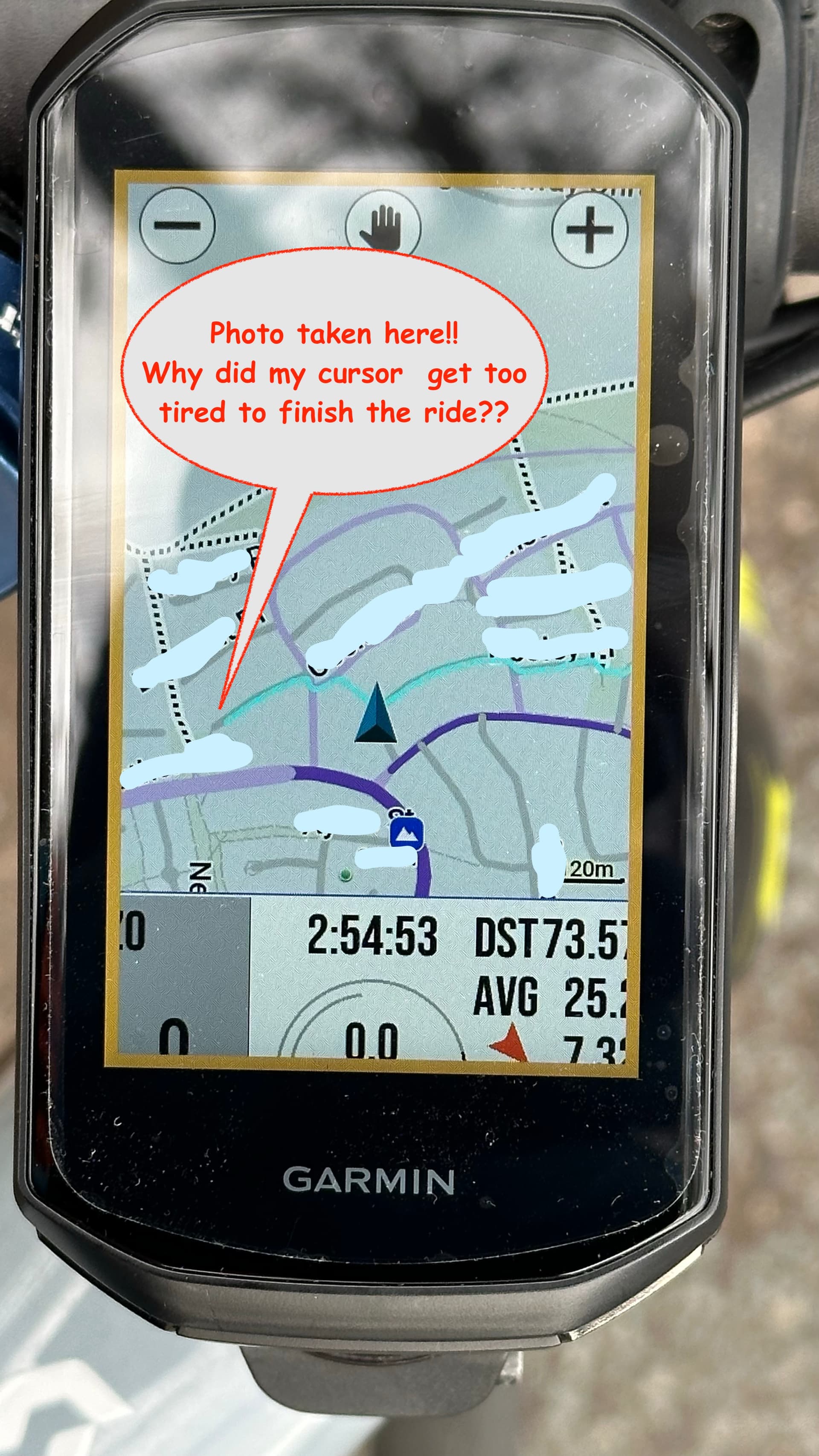
My Edge 1050 did something quite bizarre today at the end of my first decent ride with it.
The cursor stopped moving for the last few hundred meters even though the trace line still showed my location!?
So my actual location was always shown by the end of the blue line which kept going with me to the point I took the photo - I did not back track to where the cursor is shown.
The cursor stopped where I took a footpath between 2 streets, as if it couldn’t go up the footpath or it was set to stay on roads, except I’d already taken at least one similar footpath shortcut just before that and half my ride was on bike paths, so I don’t think that can be relevant really.
It seemed like my Garmin was as buggered as I was, because this was my first real ride since bruising my ribs and it felt like it was about 30kms further than my back muscles were up for. 
Thanks Garmin. 
Firmware 28.20 public roll-out has started. There’s a ton of updates rolled into this one that don’t get a mention in the official changelog, including the ability to disable Virtual Partner… the ONE feature people will want to know about.  . I’m messing about with VP at the moment… Looks like if you disable it (which requires you to load a route for it to show on the menu) it is disabled for all bike profiles. 28.20 also brings all the Edge MTB features to the 1050 (5Hz, Timing Gates, etc).
@McCookie Re: Your positioning issue. Have you tried switching off. Activity Profiles, select a profile, and select Navigation > Routing. Lock On Road. That could have been causing the issue. It might know about some paths/trails and not about others.
Yay, thanks Shane. I’ll keep an eye out for the update and investigate the routing.
It kinda seems insane that the cursor stops just because it’s set to navigate via roads, but insanity is what technology does best.
Actually, now I think about it, I’m gonna see if it lets me navigate along that path….
I did have that time when I couldn’t get ANY routing software to create a route from the Federal highway leaving Canberra, and exiting at Eagle Hawk onto the service road. There was an impenetrable black hole on that exit ramp.
I think you got it right for the cursor positioning, Shane.
I just tried to navigate back to the other side of that footpath and it takes me the long way around the block. On closer inspection that footpath isn’t shown on the map. Pathetic! The footpath has been there since the suburb was built in 1967! 
Let me guess, if you turn off VP it’s back on by default next time your ride? That would be a very Garmin solution…
the virtual partner is a total POS.
The setting is saved after reboots. If it’s off, it’s off.
How do Garmin rollouts work?
Is there any tricks to getting updates sooner rather than later? Not that I’m in a hurry or nothing……..
Phased… so it’s a lottery. 
WOO HOO - I won the lottery!
They missed the chance to add a “welcome to 2006” boot screen on the update.
I look forward to the upcoming @GPlama videos explaining all the other updates.
Now we just need Wahoo to fix Hels’ Bolt…